

A little tip for a Friday afternoon.
For decades now, no matter the project I’m working on, there ends up being the moment where a client or colleague sends me a small-medium sized spreadsheet of data they’ve put together and asked me to import that into an existing table in MySQL.
For Example:
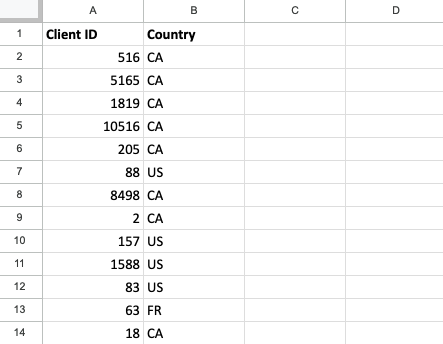
Instead of figuring out the Engine’s Import from CSV command, and trying to map the right fields and field types, or forgetting that this spreadsheet is missing required fields like the timestamps, I usually just reach for this hack.
I use the CONCATENATE function to create the SQL insert or update statement I need, like:
=CONCATENATE("INSERT INTO client_country (client_id, country_code, created_at, updated_at) VALUES(", A2, ", '", B2, "', NOW(), NOW());")and then copy that down all the rows in the spreadsheet.
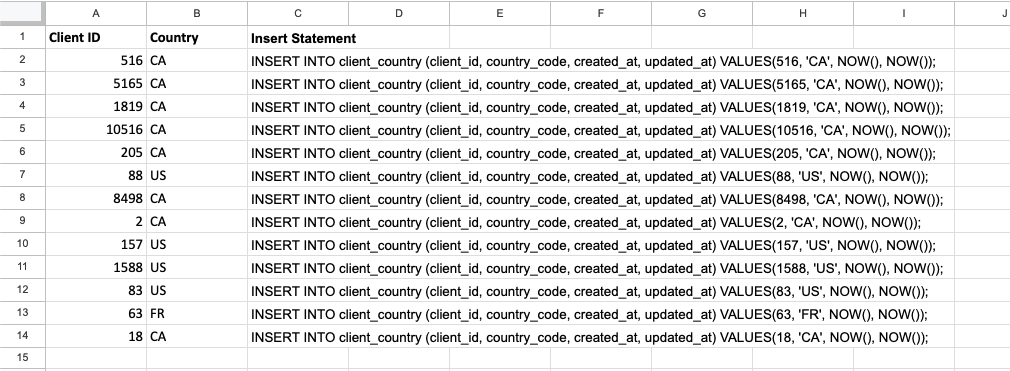
I then just copy all the values from that column into my SQL application (I’m using TablePlus on MacOS right now), and run the query.
I’ve always found this to be a hacky way to do things, but faster than using the GUI tools to do it.
Am I the only one who does this?
@shooper I mean, okay, neat, but why not just export as a CSV and then import the CSV? It would take like a fraction of the time. And none of the effort in writing the code. Literally every spreadsheet program I've ever seen can export as a CSV, and importing as a CSV using whatever GUI tools you use is only like a couple of clicks?
Remote Reply
Original Comment URL
Your Profile
Why do I need to enter my profile?
This site is part of the ⁂ open social web, a network of interconnected social platforms (like Mastodon, Pixelfed, Friendica, and others). Unlike centralized social media, your account lives on a platform of your choice, and you can interact with people across different platforms.
By entering your profile, we can send you to your account where you can complete this action.
@shooper I mean you can also do something like this if you're adverse to GUIs for some reason:
LOAD DATA LOCAL INFILE 'C:/path/to/your/data.csv'
INTO TABLE your_table_name
FIELDS TERMINATED BY ','
ENCLOSED BY '"'
LINES TERMINATED BY '\n'
IGNORE 1 LINES;
Remote Reply
Original Comment URL
Your Profile
Why do I need to enter my profile?
This site is part of the ⁂ open social web, a network of interconnected social platforms (like Mastodon, Pixelfed, Friendica, and others). Unlike centralized social media, your account lives on a platform of your choice, and you can interact with people across different platforms.
By entering your profile, we can send you to your account where you can complete this action.
I’ve found this weird way of doing it to be quicker in many cases.
In this example, it was setting the NOW() values on the created_at and updated_at columns. I could have added that data to the spreadsheet, hopefully in the right format, and then uploaded it.
If it’s a huge amount of data, I’d definitely reach for the real tools.
@shooper
But why? Most databases have CSV import.
Remote Reply
Original Comment URL
Your Profile
Why do I need to enter my profile?
This site is part of the ⁂ open social web, a network of interconnected social platforms (like Mastodon, Pixelfed, Friendica, and others). Unlike centralized social media, your account lives on a platform of your choice, and you can interact with people across different platforms.
By entering your profile, we can send you to your account where you can complete this action.
I’ve often found this way just a little faster than using the import tools, which often need you to map field names, etc. In this case, I also needed to add columns that weren’t in the spreadsheet with the NOW() function. Simple to do in SQL.
@shooper
I don't know about it being faster, but you can deal with the NOW() issue by two methods:
1. Load CSV data into an existing table, in which any columns not present in your CSV have a default value. A column's default value can be an expression; if it is, it will be evaluated when rows are inserted (including, presumably, by loading from CSV). A default value of (NOW()) will work as it should.
Remote Reply
Original Comment URL
Your Profile
Why do I need to enter my profile?
This site is part of the ⁂ open social web, a network of interconnected social platforms (like Mastodon, Pixelfed, Friendica, and others). Unlike centralized social media, your account lives on a platform of your choice, and you can interact with people across different platforms.
By entering your profile, we can send you to your account where you can complete this action.
@shooper
2. Load CSV with the extra columns nullable, then UPDATE all rows to add the missing data, then ALTER TABLE to make the extra columns NOT NULL.
Remote Reply
Original Comment URL
Your Profile
Why do I need to enter my profile?
This site is part of the ⁂ open social web, a network of interconnected social platforms (like Mastodon, Pixelfed, Friendica, and others). Unlike centralized social media, your account lives on a platform of your choice, and you can interact with people across different platforms.
By entering your profile, we can send you to your account where you can complete this action.